What Is WorkPace.
WorkPace is a break and exercise software solution proven to help prevent, and aid recovery from OOS Occupational Overuse Syndrome, also some times referred to as Musculoskeletal Disorders (MSD) Repetitive Strain Injury (RSI), Upper Limb Disorder (ULD) and Carpal Tunnel Syndrome.
The software provides an integrated health and safety solution for computer users, with break, stretch and exercise reminders, ergonomic training, monitoring of discomfort levels, and statistics on computer use.
WorkPace also integrates with the Wellnomics Risk Management System, a sophisticated management and reporting tools that may be utilised in performing risk analysis. See www.wellnomics.com for more details.
WorkPace is highly customisable. It may be used for the most demanding rehabilitation case through to non-intrusive risk mitigation. WorkPace has been implemented in a variety of workplaces including call centres, time critical office situations and face to face customer environments.
Being activity based, WorkPace provides break reminders only when needed. These include:
· Micropauses - short breaks after a medium level of continuous activity.
· Rest breaks - medium term breaks with optional exercises after longer periods of continuous activity or preset regular intervals.
· Daily/Weekly Limits - Warnings after preset work limits have been reached.
All settings are optional and are easily configurable and may be implemented with various enforcement levels from non-intrusive to strict enforcement.
You may download a 30 day trial version from www.workpace.com or request a disk from Balanced Ergonomics.
Balanced Ergonomics provides a complementary pilot program to assist in evaluating the effectiveness of WorkPace in your organisation. Please feel free to contact us for more information.
What the user sees
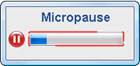
Micropause reminders will appear on the users screen after a preset period of continuous use. The user may complete the current task then take a short break (usually a few seconds), look away from the screen then continue working. Natural breaks are taken into account.
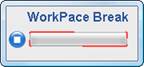
Rest break reminders will appear on the users screen after a preset period of continuous use. As with the micropause the user may complete their task. If they choose to stop their computer activity an optional exercise window will appear. They may choose to do the exercises or perform another task for the duration of the break (Usually a few minutes). Natural breaks are taken into account.
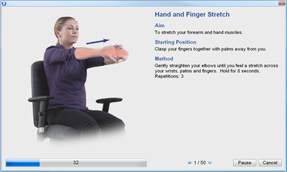
Optional exercise window. This window will display medically endorsed exercises suitable for computer users. The window will appear based on continuous use or accumulated use depending on the user settings. You may also choose to take exercises at any time.
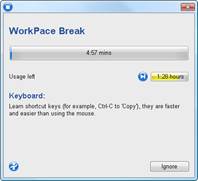
Break Countdown Timer. This window will appear after a period of continuous use or at the completion of the exercises to give a visual indication of the remaining break time.
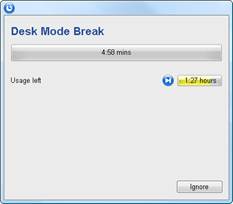
Desk Mode Timer. This window will appear after a period of inactivity on the keyboard or mouse and servers as a good reminder to take a break from non computer related activities.